
Cancel an order line
More control over your orders
Want to respond more quickly to changes in an order? With our new feature, you can now cancel an order line yourself. No need for contact and immediate clarity about the status of the order line. This makes working a lot more efficient.
How does it work?
Cancelling an order line is quick and easy:
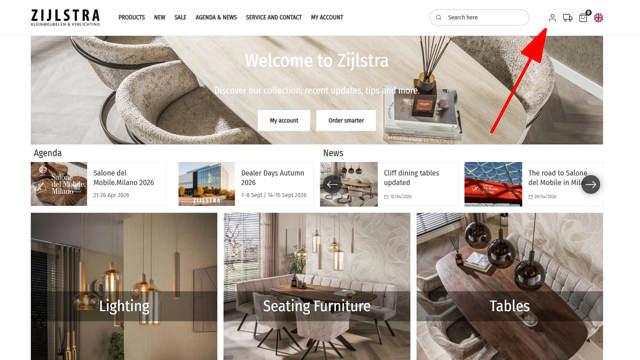
- Click the account icon in the top right.
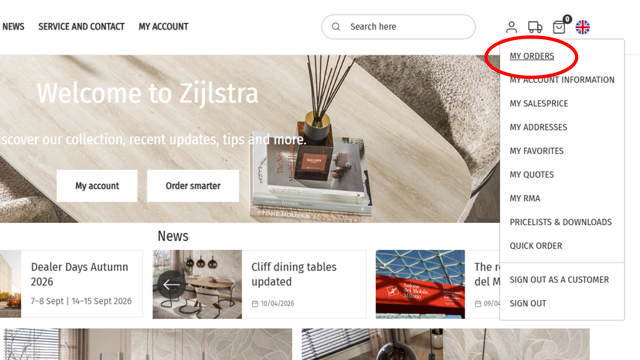
- Go to My orders.
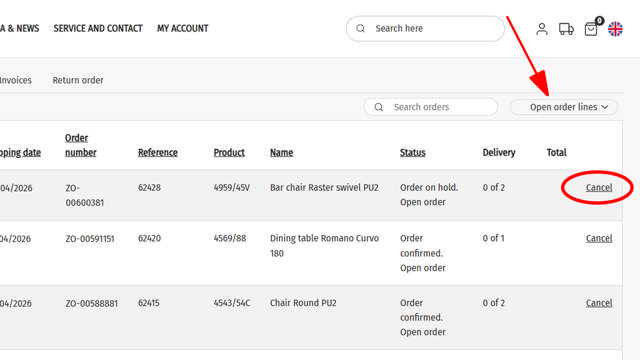
- Make sure the filter is set to Open order lines.
- Find the correct order and the relevant item.
- Click Cancel on the corresponding order line.
View the images to see how it works, so you can get started right away.
Why is this useful?
- Faster action: Make changes yourself instantly, without intermediaries.
- More control: Cancel only the relevant order line, not the entire order.
- Efficient working: Less email traffic and faster processing.
Discover more smart features
This functionality is one of many smart tools in our webshop designed to make the ordering process simpler and more efficient. Think of practical insights, greater control over your orders and features that speed up your daily work.
Curious about what else is possible?
View the complete overview of all smart features and get the most out of your account.