
Set Your Own Price Display
Work with the price you want to see
From now on, you decide which prices are visible on the product pages. Choose purchase price, my selling price, recommended retail price or no price display. This way, you can work more efficiently and browse the webshop together with your customer – without them seeing your purchase prices.
How does it work?
Setting your price display is very simple. Follow these steps:
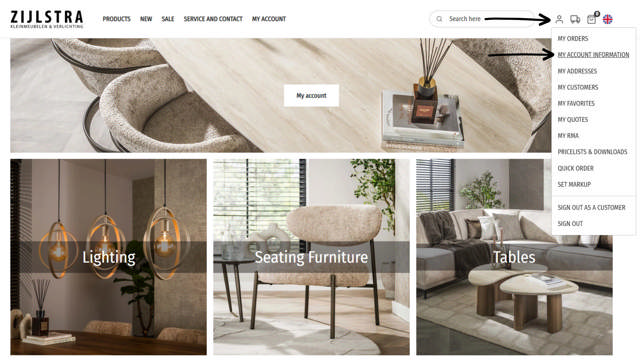
1. Click the account icon in the top right corner.
2. Go to My account information.
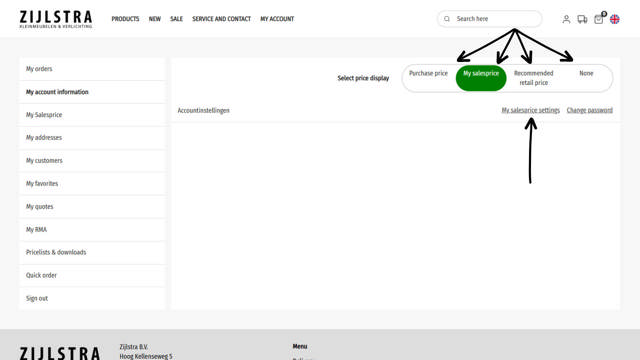
3. Select the desired price display:
Purchase price, My salesprice, Recommended retail price
or No price display
Have you chosen My salesprice?
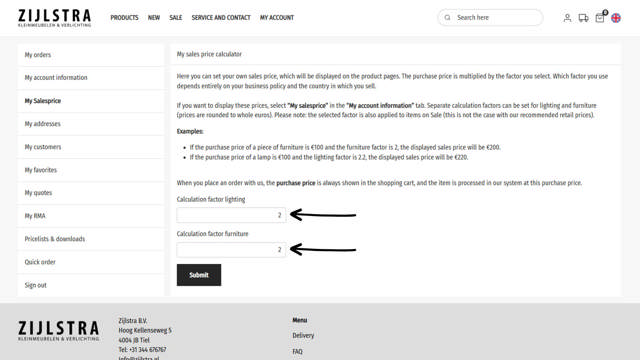
4. Then click on My salesprice settings.
5. Enter your own calculation factor and click Submit.
Check the images to see how it works and get started right away.
Why is this useful?
- Browse with your customer: Show products without revealing your purchase price.
- Flexibility: You decide which price information matters.
- Overview: Work your way, without extra tools.
More smart features
We’ve already launched several handy features to make your ordering process faster and easier – and we’ll keep going! Follow our website and socials for the latest updates and tips. That way, you’ll get the most out of your orders.